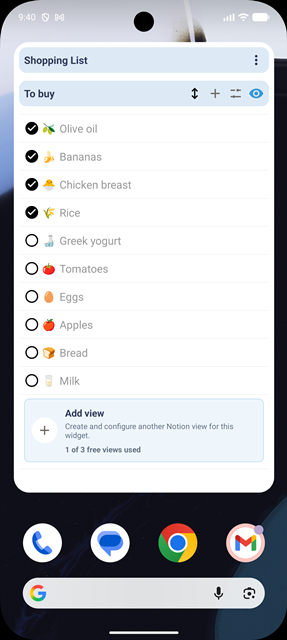
Notion on your Android home screen.

Your Notion tasks and projects, ready to view and update. Right on your home screen.

Get it on Google Play

Connect Notion, choose a view and make it part of your home screen.

NotiZen Widget on an Android home screen

Build your Notion home screen

One free widget. More spaces when your workflow grows.

Start with Basic for free. Pro lets you add more widgets, sources and saved views, removes the daily widget action limit and adds advanced controls.

Your Basic widget

Today / Daily tasks

Basic · No time limit
Custom ViewsTodayThis weekFocus
Review today’s prioritiesToday
Plan the next focused blockNext
Check off a completed taskDone

Basic includes up to 3 saved Custom Views, 3 data sources and 5 successful widget actions per day, with filters, sorting and basic customization.

Additional widgets with Pro

Give different contexts their own space

Add widgets for separate workflows, save more than 3 Custom Views, or use compact mode and advanced metrics with Pro.

Work

Separate your work database from personal planning.

Projects

Give an active project its own home screen space.

Personal

Keep errands and personal tasks separate.

Habits

Make routines visible without opening Notion.

Shopping

Keep a personal or shared shopping workflow at hand.

Clients

Keep client tasks or pipelines in a dedicated widget.

Custom Views = saved views you can use in a widget: up to 3 with Basic.

Additional widgets = separate spaces and contexts on your home screen.

Basic and Pro

Basic limits and what Pro unlocks

Basic does not expire. Pro removes usage limits and adds advanced features.

How does the daily widget action limit work?

Basic includes 5 successful widget actions per day, such as supported property edits. Failed changes do not use the allowance. It resets at the start of the next day in your device's time zone. Actions inside the app are unlimited on both plans; Pro also removes the widget action limit.

Is NotiZen free?

Basic is free with no time limit: 1 active widget, up to 3 Notion data sources, up to 3 saved Custom Views and 5 successful widget actions per day. Actions inside the app are unlimited.

What does Pro unlock?

Pro removes the Basic limits on widgets, data sources, saved Custom Views and widget actions. It also unlocks view duplication, compact mode, advanced metrics and advanced visibility controls.

Are Custom Views free?

Basic includes up to 3 saved Custom Views, filters, sorting and basic customization. Pro removes the saved-view limit and adds view duplication, compact mode, advanced metrics and advanced visibility controls.

What happens if I cancel Pro?

You can cancel anytime through Google Play. When Pro ends, you can choose which configured widget stays active under Basic limits. Your other widget configurations are preserved and become available again when you activate Pro. Existing views and sources are kept; if you are over a Basic limit, you can edit or reduce them but cannot increase the count. Pro presentation settings are retained, but Pro-only controls require an active subscription.