Notion database widgets
Show selected Notion databases as Android widgets for quick scans, lightweight planning and daily productivity.
NotiZen Widget features
Turn your Notion workspace into practical Android widgets for tasks, databases, Custom Views, reminders, and focused workflows. Basic includes 1 active widget for free, with usage limits.
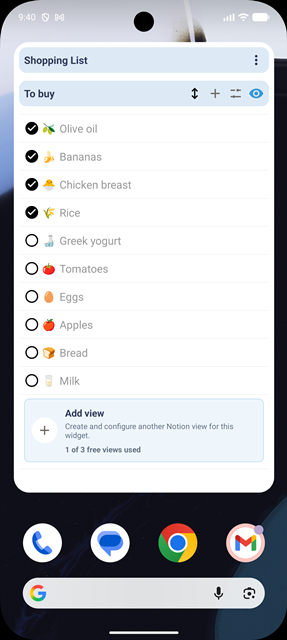
Android home screen widgets
Create a Notion widget Android setup for tasks, databases and important workflows, then review what matters without opening Notion every time. Basic includes 1 active widget, up to 3 data sources, 3 saved Custom Views and 5 successful widget actions per day. Pro removes these limits and adds advanced controls.
Custom Views
Notion Custom Views turn one database into a smaller Android view for a specific job. Basic includes up to 3 saved Custom Views, filters, sorting and basic customization. Pro adds view duplication and advanced controls. Compare Basic and Pro on the pricing comparison.
Editable properties
NotiZen does more than display rows. Basic allows 5 successful widget actions per day, including supported property updates. Pro removes this daily limit. Full page editing and complex database changes stay in Notion.
Clean widget layout
Choose what appears in each widget so a Notion database does not become visual noise. A clean layout helps each Android home screen productivity workflow stay easy to scan.
Appearance
A light and dark mode widget is useful when readability depends on wallpaper, theme and placement. Each widget can follow the system or use a light or dark appearance from its own settings.
Filters and sorting
These controls help a Notion database widget Android setup show only the relevant rows, in the right order, with compact context at the top when metrics help. Filters, sorting and the basic item-count metric are included in Basic. Advanced metrics, compact mode, view duplication and advanced visibility require Pro.
Continuity and context
NotiZen also supports deeper setup continuity and calendar context for workflows that need more than a basic database glance.
Popular workflows
These examples combine Custom Views, visible properties, filters, sorting, supported editable properties and appearance settings without turning the home screen into a full Notion replacement.
Use a focused Custom View with date, checkbox and status properties so today tasks stay visible.
Pair visible properties with filters, sorting and header metrics to keep project work scannable.
Show publish dates, select fields, status and a clean widget layout for drafts and planned releases.
Keep recurring actions close with checkbox visibility and a compact Custom View for the current routine.
Turn a Notion database into a lightweight Android widget for books, articles or study material.
Use Custom Views, sorting and light or dark appearance to review the week from your home screen.
Show errands, reminders, due dates and simple status fields without opening Notion each time.
Use advanced filters and visibility controls to show only the rows that belong to the current context.
Pro
Basic has no time limit and includes 1 active widget, 3 data sources, 3 saved Custom Views and 5 successful widget actions per day. Pro removes these limits and adds view duplication, compact mode, advanced metrics and visibility controls.
Setup links
Use these pages when you want exact setup steps for Notion sharing, Custom Views, widgets and supported property editing.
FAQ
Short answers about Android widgets, supported property editing, relation visibility, appearance and billing.
Actions inside the NotiZen app are unlimited on both plans. Basic also includes 5 successful widget actions per day, such as supported property edits. Failed changes do not use the allowance. The widget allowance resets at the start of the next day in your device's time zone, and Pro removes that daily widget limit.
Yes. Install NotiZen Widget, connect Notion, select the database you want to use, or a page that contains it, then choose the database inside NotiZen and add the widget from your Android launcher.
Yes. Basic allows 5 successful widget actions per day; Pro removes that limit. Current supported types include checkbox, date, select, and status; other properties may be visible but read-only.
Yes. Each widget can use system appearance or a light or dark setting, depending on the widget configuration you choose.
Yes, relation properties can be shown as visible context when your view includes them. Treat relations as read-only unless the app explicitly supports editing that property type.
Basic is free with no time limit and gives you the core NotiZen workflow: Inbox, Today, Upcoming, unlimited actions inside the app, up to 3 Notion data sources, up to 3 saved Custom Views, 1 active widget and 5 successful widget actions per day. Basic is not a trial. There is currently no Pro free trial.
Pro is for workflows that grow. It removes the Basic limits on widgets, data sources, saved Custom Views and widget actions, and adds view duplication, compact mode, advanced metrics and advanced visibility controls.
No. NotiZen complements Notion by making selected databases and workflow views easier to see and update from Android. Full page editing and complex workspace work still belong in Notion.