
Inbox, Today and Upcoming
Review pending work, what matters today and what is coming next. Keep overdue work in view where the selected task filters include it.
NotiZen features
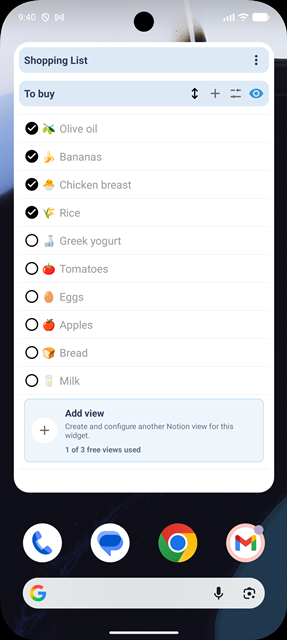
Plan your day, complete and reschedule tasks, and organize the views you use into collections. Keep your data in Notion and bring the right context to Android, inside the app and on your home screen.
Start free with Basic. A widget is optional: you can work with tasks and views inside NotiZen.
Tasks
Connect a task source and configure its supported date and completion properties. Use the same Notion data through focused sections on your phone.
Views and collections
A view decides what to show. A collection brings related views together, such as Clients, Open projects and This week inside a Work collection.
Widgets
Extend your daily system to the Android home screen when you want your priorities visible between app visits.
Connections and continuity
Notion remains your source of truth. Start with the content you have permission to share, then add optional context when you need it.
Basic and Pro
Both plans include task management, filters, sorting, basic customization and the item-count metric. Pro adds capacity and advanced controls inside the app and in widgets.
Basic · Free
Pro
Source, collection and saved-view quotas apply across your NotiZen setup. Reusing the same source does not count as another source. Item limits describe how many items a view can display, not the size of your Notion database. Supported property types and integration limitations still apply on both plans.
FAQ
What you can do, what you need to connect and when Pro becomes useful.
No. You can manage tasks and consult saved views inside the Android app. Widgets are an optional way to keep selected work on your home screen.
Basic is free with no time limit and gives you the core NotiZen workflow: Inbox, Today, Upcoming, unlimited actions inside the app, up to 3 Notion data sources, 3 collections, 3 saved Custom Views, 1 active widget, 5 successful widget actions per day and up to 100 items per view.
A collection groups saved views in NotiZen. For example, a Work collection can contain separate client, project and weekly views. It organizes your NotiZen setup without relocating pages in Notion.
Editing depends on the property type and the available editor. Some properties are read-only. Basic and Pro support the same available property editors; Pro does not unlock editors that are still pending. Pro also offers supported configuration editing for linked Notion views.
Pro is for workflows that grow. It removes the Basic limits on widgets, data sources, collections, saved Custom Views and widget actions, and adds view duplication, supported linked Notion view settings, compact mode, advanced metrics, advanced visibility controls, widget-title hiding and up to 300 items per view.
Notion keeps your original content. NotiZen focuses on daily tasks, views, collections and supported property updates on Android. Full page content editing and deeper workspace management remain in Notion.
Connect Notion, configure a task source or view, and try Basic at your own pace. Add a widget when it helps you keep work visible.
 Read the setup guideCheck property compatibility