
More collections for more contexts
ProMove beyond Basic's three collections. Keep clients, projects and personal areas organized in separate collections, with no Pro collection quota.
NotiZen Pro
Keep more projects, areas and views organized in one Android system. Pro removes the Basic capacity limits and gives you deeper control over the views you use inside NotiZen and in widgets.
Basic stays free. Pro is a Google Play subscription with monthly and available annual plans; no Pro free trial is currently offered.
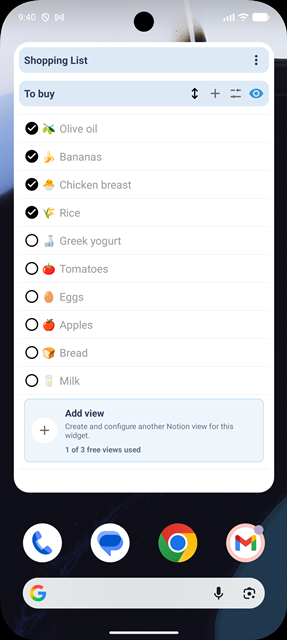
More capacity
Choose Pro when the system you already use needs more space. Your tasks and views remain connected to their original Notion data.
Advanced controls
Pro adds tools for configuring and presenting your system. The available property editors and integration permissions still determine what can be changed.
What to expect
Choose Pro for capacity and advanced controls. Keep these product boundaries in mind before purchasing.
Pricing
Build a useful daily workflow for free. Choose Pro when you need more collections, sources, views or advanced controls.
Basic · Free
Basic has no time limit and is not a trial. The included capacity and controls are listed below.
Google Play subscription
See your local price in Google Play
Pro is purchased and managed through Google Play in the Android app. Monthly billing is supported, with an annual option when available. Google Play shows the available plans, local price and renewal period before purchase.
You can cancel anytime through Google Play. When Pro ends, you can choose which configured widget stays active under Basic limits. Your other widget configurations are preserved and become available again when you activate Pro. Existing views, collections and sources are kept; if you are over a Basic limit, you can edit or reduce them but cannot increase the count. Pro presentation settings are retained, but Pro-only controls require an active subscription.
Basic widget actions reset daily in your device's time zone. Only successful changes count; actions inside the app stay unlimited. No Pro free trial is currently offered.
FAQ
Limits, billing and what happens when your subscription ends.
Basic is free with no time limit and gives you the core NotiZen workflow: Inbox, Today, Upcoming, unlimited actions inside the app, up to 3 Notion data sources, 3 collections, 3 saved Custom Views, 1 active widget, 5 successful widget actions per day and up to 100 items per view.
Pro is for workflows that grow. It removes the Basic limits on widgets, data sources, collections, saved Custom Views and widget actions, and adds view duplication, supported linked Notion view settings, compact mode, advanced metrics, advanced visibility controls, widget-title hiding and up to 300 items per view.
Yes. Pro removes the collection, source and saved-view limits inside the Android app as well. Widgets are optional; actions inside the app are unlimited on both plans.
Pro is purchased and managed through Google Play in the Android app. Monthly billing is supported, with an annual option when available. Google Play shows the available plans, local price and renewal period before purchase.
Actions inside the NotiZen app are unlimited on both plans. Basic also includes 5 successful widget actions per day, such as supported property edits. Failed changes do not use the allowance. The widget allowance resets at the start of the next day in your device's time zone, and Pro removes that daily widget limit.
You can cancel anytime through Google Play. When Pro ends, you can choose which configured widget stays active under Basic limits. Your other widget configurations are preserved and become available again when you activate Pro. Existing views, collections and sources are kept; if you are over a Basic limit, you can edit or reduce them but cannot increase the count. Pro presentation settings are retained, but Pro-only controls require an active subscription.
Start with Basic in the Android app. When you need more capacity or advanced controls, review the Pro plans available in Google Play.
Read the setup guideCheck property compatibility